Tech
How to archive your photos in the digital age


Wasim Ahmad, Quinnipiac University
Taking photographs used to be a careful, conscious act. Photos were selective, frozen moments in time carefully archived in albums and frames. Now, taking a photograph is almost as effortless and common as breathing – it’s something that people do all the time in the age of smartphone cameras with seemingly endless digital film.
But the downside to capturing every moment is that it creates a mountain of those moments to save for the future. Those photos can be easily lost if they’re not archived properly. All it can take is one accidental dip in the toilet for your phone, and all that data is lost forever.
So what’s a practical backup strategy for the average person? Here are a few ways to make sure memories are never lost:
Cloud storage
The simplest way to archive your photos is cloud storage. For Apple users, there’s iCloud, which starts at US$0.99 per month for 50 gigabytes all the way to $59.99 per month for 12 terabytes with various tiers in between. With an average iPhone photo clocking in at 3 megabytes, that’s a little over 16,000 photos for the cheap plan and 4 million or so for the largest plan. Google’s Google One cloud storage is most cost effective for yearly plans, with 2TB going for $99.99 per year and 5TB going for $249.99 per year.
The actual amount you can store in that space does vary greatly with how a file is shot. Video has larger file sizes than photos. HEIF files, a newer format on Apple phones, compresses files into smaller packages, but long-term compatibility is unknown since the format hasn’t been in use for as long as the standard JPG file, which has been around since 1992.
While cloud services from big providers generally provide the easiest way for most average folks to back up their photos, and operate with little to no intervention via apps that are already on the phone constantly uploading every photo taken, there are risks involved.
Big companies often change their policies about how photos are saved. For instance, depending on what phone and when it was bought, Google’s cloud storage may have saved photos in a “storage saver” format that lowers the quality of images by sizing them down or compressing them differently. This affects your ability to make high-quality prints or view the photos on high-resolution screens down the road. Unless someone is astute enough to notice small text here and there that mentions it, most users won’t even realize it’s happening.
And what happens to cloud services when things go badly wrong? Users of photo backup service Digital Railroad found out the hard way. In 2008, the company abruptly shut down and gave its users 24 hours to download everything before the servers were shut down. Photographers rushed for the exits, trying to grab their photos on the way out, only to strain the servers to the point where few were able to recover anything at all. If this was the only way photos were backed up, it’s a lost cause.
So while the cloud is easy, costs can add up and terms of service can change at a moment’s notice. What are some ways for photographers to control their own fate?
Hard drives and network-attached storage
Manually taking photos off a phone may take some extra time, but the approach offers peace of mind that cloud services can’t necessarily match.
Almost all phones can plug into a computer’s USB port and use the built-in photos app on both Windows or MacOS to download photos to a computer. Apple users can use a method called AirDrop to send photos wirelessly to other Apple devices as well, including laptop and desktop computers.
Now loading photos onto a local hard drive built into the machine can fill it up quickly, but there is a cost-effective way to get around that – namely, external hard drives. Theses are storage devices that you can plug into your computer as needed. They can be of the older and less expensive type with spinning platters or more modern solid-state drives that can survive a drop and greater temperature changes than the older drives can.
These are different than flash drives, more commonly known as thumb drives because of their small size, that are designed as temporary storage to shuffle photos from one place to another.
It’s easy to buy more than one hard drive to have duplicate backups in case of failure or catastrophe, but the downside is that there’s no easy access from the internet to your photos, and backup is generally a process that users must remember to do.
Network-attached storage is one way to solve the cloud storage problem while retaining the ability to access photos from the internet. These are essentially hard drives – sometimes multiple hard drives linked together for even greater or faster storage – that are connected to a router that allows for access to the internet through specialized software.
While not as easy as most third-party cloud storage services, once it’s set up, a network-attached storage unit is a flexible way to store your photos safely and accessibly. There are even companies that specialize in fireproof and waterproof units for extra insurance in case of disaster.
Printing photos
If cloud storage and hard drives seem too complicated, there’s always the old-fashioned approach of printing. There’s still something magical about seeing a photo on a wall or in an album, and thankfully there are ways to print professional-quality archival prints without having to go to a drugstore.
The easiest and most cost-efficient types of printers are dedicated 4×6 printers using a technology similar to professional labs called dye-sublimation. These yield high-quality, waterproof prints that cost about the same as what one would pay for drugstore developing. HP makes its popular Sprocket line of printers, though those require a phone and an app to print from, which makes plugging in a memory card from a professional camera out of the question. However, Canon’s Selphy lineup includes many models with screens and a card slot to make that possible.
The rabbit hole goes very deep, and there are many professional printers that can print even larger sizes. Canon and Epson dominate this space, marketing a range of pigment- and dye-based printers that can emphasize archival needs or color saturation, respectively.
Another option is ordering a photo book, which, as the name suggests, is a physical bound book of your photos. However, photo books are probably more appropriate for memorializing an event – trip, wedding, project – than general archiving, given the typical costs and number of photos involved.
There’s little reason to not make some sort of backups of photos in 2024, whether that’s on printed media, hard drives or in the cloud. The important thing is not which method to use, but to do it at all.
Wasim Ahmad, Assistant Teaching Professor of Journalism, Quinnipiac University
This article is republished from The Conversation under a Creative Commons license. Read the original article.
Our Lifestyle section on STM Daily News is a hub of inspiration and practical information, offering a range of articles that touch on various aspects of daily life. From tips on family finances to guides for maintaining health and wellness, we strive to empower our readers with knowledge and resources to enhance their lifestyles. Whether you’re seeking outdoor activity ideas, fashion trends, or travel recommendations, our lifestyle section has got you covered. Visit us today at https://stmdailynews.com/category/lifestyle/ and embark on a journey of discovery and self-improvement.




Tech
Professional gaming is brutal on the body – inside the growing field of treating esports injuries
Professional gaming can cause serious physical and mental strain, including wrist injuries, back pain, vision problems and sleep disturbances. As esports grows, specialists are developing new prevention and rehabilitation strategies to protect players.

Erica D. Henn, Temple University
Chinese esports player Jian “Uzi” Zi-hao was more than a star “League of Legends” player: He was so talented that his team structured its entire strategy around his abilities, funneling resources to him and another teammate, Shi “Ming” Sen-Ming, so the duo could lead the team to victory. Over the course of his career, he earned more than US$500,000 in tournament prize money.
And yet in 2020, Jian announced his retirement, his storied career cut short by chronic wrist and arm injuries.
He was 25 years old.
Video games have a reputation for keeping people glued to the couch. But for those who compete against the best players in the world, gaming can be surprisingly physically and mentally taxing.
The strain of ‘climbing the ladder’
The best esports players often have grinding schedules. They’re expected to regularly practice, participate in scrimmages and compete in official matches. Even at the recreational level, esports players cite the mental toll: playing for hours a day, every day, to hone their skills so they can “climb the ladder.”
A 2021 study of Portuguese esports players found that 37% experienced anxiety and depression, and 45% experienced sleep disturbances. The most common physical injuries in esports generally fall under eye problems and musculoskeletal issues.
Prolonged screen time leads to many types of vision problems in gamers, from the more common eye fatigue to a decreased ability to focus. Furthermore, the light emitted from screens appears to contribute to sleep disturbances by disrupting the release of melatonin, the hormone that helps regulate your sleep-wake cycle.
Many esport players – professional or otherwise – also battle hand and wrist pain, with repetitive button-smashing causing injuries such as carpal tunnel syndrome, tendonitis and “gamer’s thumb,” which arises from overuse or irritation of the tendons around the thumb and wrist. Many of the overuse injuries seen among video game players are also familiar to assembly-line workers, whose jobs can involve similarly repetitive movements.
Then there are the back injuries. Players can remain seated for three or more hours without a break, and this prolonged sitting can take a toll on the lower back and spine.
The sedentary nature of esports has also led to a lesser-known – sometimes fatal – injury called deep vein thrombosis: a blood clot, often in the leg, that can become life-threatening if it travels to the lungs. In 2011, British gamer Chris Staniforth – who would play for as long as 12 hours at a time – died of the condition.
Preventative measures
As more esports injury research has been published, more treatment and prevention strategies have emerged.
Top esports teams now have physical therapists, performance psychologists, athletic trainers and even massage therapists on staff to optimize the performance and recovery of their players.
Teams often incorporate group exercise activities to both build rapport among players and reduce the risk of injuries. During competition, proper positioning of the spine and limbs has become an essential injury prevention strategy. For example, selecting a chair that encourages an upright posture can reduce pain and injury risk, especially when gamers couple ergonomics with an exercise program that centers on functional strength, mobility and stretching of the upper limbs.
Looking to the stage
When esports began gaining mainstream popularity in the 1990s and early 2000s, its proponents were eager to draw comparisons to traditional sports and athletic competition. The parallels helped establish esports’ legitimacy and gave non-gamers a familiar framework for understanding the competition.
As esports became a big business and a lucrative career path, players and teams hired a web of support staff – trainers, coaches and therapists – that mirrored the structure of professional sports. In this vein, a lot of esports injury research has pulled from the training methods of traditional sports.
However, as a scholar of exercise science, I think injury treatment and prevention strategies could be further improved by seeing esports competitors as more like musicians and dancers than football players and basketball players.
Performance optimization and injury research on professional performing artists has existed for centuries, and I think it represents a valuable, untapped resource. That’s because the physical and mental stresses experienced during musical performance have a lot in common with esports competition: long stretches of sitting; small, dexterous hand movements; and performing without the real-time input of a coach.
For example, biomechanics research has found similar patterns of forearm muscle fatigue among esports players and piano players. However, no studies to date have directly compared the two groups.
And what if the interest in joint hypermobility or hand size among performing artists were translated to esport populations? Could popular piano warm-up exercises be effective for esports athletes who use keyboards?
Even research on sports like car racing might offer valuable insights. As with gamers, many people overlook how physically demanding car racing can be – and yes, that includes sitting for extended periods of time.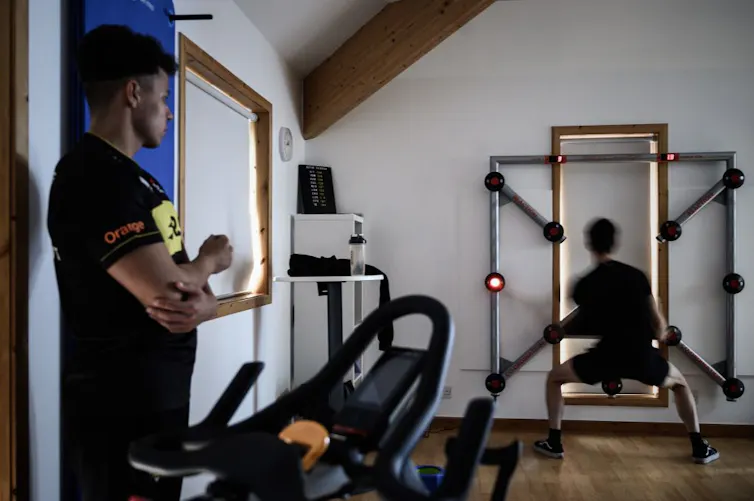
Prevention and rehabilitation techniques continue to improve. Even Jian, the player who retired in 2020, returned to play for a few splits, or partial seasons, in 2022 and 2023.
In July 2023, “League of Legends” star Lee “Faker” Sang-hyeok was relegated to the bench due to cubital tunnel syndrome, an injury that emerges from arm and hand overuse.
Through a treatment plan that included changing his gaming posture and intensive physical therapy, Lee was able to return to play just a month later. He went on to win three consecutive world championships, with his support team helping prevent recurrence of injury throughout each season.
Thanks to his rehabilitation, Lee’s fans will be able to follow his hunt for his fourth “League of Legends” World Championship, which kicks off in October 2026 in the United States.
Sienna Cinti assisted with the research and writing of this article.
Erica D. Henn, Assistant Professor of Kinesiology and Exercise Science, Temple University
This article is republished from The Conversation under a Creative Commons license. Read the original article.
📰 Enjoying STM Daily News? Join the conversation!
💬 Leave a comment, share your thoughts, and subscribe to our newsletter for the latest stories, updates, and “News You Can Use This Moment!” delivered to your inbox.
Stay connected with STM Daily News!
News
Joby Aviation and Toyota kick off manufacturing alliance to scale electric air taxi production
Joby Aviation and Toyota launch a joint venture to improve productivity, quality, and cost as they prepare to scale electric air taxi production.

Joby Aviation and Toyota Motor Corporation have launched the initial phase of a strategic manufacturing alliance aimed at accelerating commercial production of electric air taxis—an early step the companies say is designed to make “air mobility for all” a practical, everyday reality.
Announced June 30, 2026, the partnership formalizes a new joint venture that will combine Joby’s electric aviation development with Toyota’s production systems and operational expertise. The near-term focus: building the groundwork for commercial production while pushing improvements in productivity, quality, and cost—key factors as the industry moves from prototypes to scaled manufacturing.

What the joint venture is designed to do
According to the companies, the alliance will initially concentrate on:
- Establishing the foundation for commercial production capability
- Advancing manufacturing excellence with an emphasis on productivity, quality, and cost
- Supporting expansion of Joby’s production capacity as it works toward aircraft certification and prepares for anticipated demand
The announcement positions Toyota’s manufacturing playbook—known globally for lean production and continuous improvement—as a lever to help Joby move from development into repeatable, high-quality output at scale.
Why it matters: eVTOLs need scale, not just flight tests
Electric vertical take-off and landing (eVTOL) aircraft have become one of the most closely watched bets in next-generation transportation, but the path to viable air taxi services depends on more than successful test flights. Certification timelines, supply chain readiness, and the ability to produce aircraft consistently (and affordably) are often what separates promising technology from commercial reality.
By forming a joint venture focused on manufacturing readiness, Joby and Toyota are signaling that the next competitive frontier is industrialization—how quickly and reliably eVTOL aircraft can be built to meet safety standards and market demand.
Related Links for Further reading
- Joby Aviation (official): https://www.jobyaviation.com
- Joby Investor Relations / News (official updates & filings): https://ir.jobyaviation.com
- Toyota Newsroom (official): https://www.toyotanewsroom.com
- Toyota Global (corporate overview): https://global.toyota/en
- FAA Advanced Air Mobility / Air Taxis (context): https://www.faa.gov/air-taxis
What executives are saying
Joby founder and CEO JoeBen Bevirt emphasized the long-running relationship between the companies, calling the joint venture a reflection of shared confidence in the opportunity ahead.
“Toyota has been by Joby’s side for nearly a decade, providing invaluable guidance and support as we built the foundation for manufacturing our aircraft,” Bevirt said. “Together, we share a vision of making aerial mobility an everyday reality.”
Toyota Motor Corporation Chairman Akio Toyoda framed air mobility as an extension of the company’s broader mission.
“Since our founding, we’ve been guided by the philosophy of providing mobility for all,” Toyoda said, adding that Toyota views air mobility as “a natural extension of that philosophy—from the ground into the sky.”
About the companies
Joby Aviation (NYSE: JOBY) is a California-based transportation company developing an all-electric eVTOL air taxi. The company intends to operate its own air taxi service in cities worldwide and sell aircraft to other operators and partners.
Toyota (NYSE: TM) has operated in North America for nearly 70 years and says it is focused on sustainable, next-generation mobility through Toyota and Lexus brands. Toyota reports nearly 64,000 employees in North America, 14 manufacturing plants, and more than 1,800 dealerships. The company also noted that its North Carolina plant began assembling automotive batteries for electrified vehicles in 2025.
What to watch for next
For readers tracking the air taxi sector, the next milestones will likely center on:
- Details on how the joint venture will be structured operationally
- Updates on Joby’s certification progress and production ramp timelines
- Signs of how manufacturing improvements translate into cost reductions and throughput
- Additional agreements or expanded collaboration as the alliance progresses
While the companies highlighted expected benefits, they also noted the usual forward-looking risks—such as regulatory certification timelines, market conditions, and the ability to finalize additional agreements.
Source: Toyota Motor North America / PRNewswire (June 30, 2026)
📰 Enjoying STM Daily News? Join the conversation!
💬 Leave a comment, share your thoughts, and subscribe to our newsletter for the latest stories, updates, and “News You Can Use This Moment!” delivered to your inbox.
Stay connected with STM Daily News!
Consumer Corner
The Evolution of Retail Technology: Connecting Consumers to Valuable Product Information


The Evolution of Retail Technology: Connecting Consumers to Valuable Product Information
(Feature Impact) For more than 50 years, traditional universal product codes (UPCs), better known as barcodes, have automated checkout, powered retail and kept the world’s products moving one scan at a time.
Watch this video to learn more
Now it’s time for the next chapter. Brands and retailers are transitioning to QR codes powered by GS1 to enhance everyday shopping experiences, unlock more information and empower customers to make informed purchase decisions with a simple smartphone scan – while still going “beep” at the register.
For decades, UPC barcodes simply provided the price of an item, but today’s shoppers are looking for more information. This retail-labeling transformation will include advanced QR codes that unlock information about ingredients, allergens, freshness, product origin, sustainability details, recipes and more. Retailers have set a 2027 target to accept these QR codes at checkout, which can help them better operate and serve their customers in numerous ways, such as preventing recalled products from being sold.
They can also help reduce food waste, save consumers money and help people make smarter purchases by encouraging shoppers to have a richer experience with the products they’re putting in their carts.
Visit gs1us.org/smarter to discover more about the future of shopping and checkout.

SOURCE:
📰 Enjoying STM Daily News? Join the conversation!
💬 Leave a comment, share your thoughts, and subscribe to our newsletter for the latest stories, updates, and “News You Can Use This Moment!” delivered to your inbox.
Stay connected with STM Daily News!